
Same model, same question, wildly different answers. I discovered that the gap between a useless AI response and a brilliant one often has nothing to do with the model — it’s all about how you ask.
The Story: One Assignment, Six Techniques
My CS146S course (The Modern Software Developer) gave us a set of coding exercises that all shared the same structure: get Llama 3.1 (8B) to solve a task correctly. The twist? Each exercise required a different prompting technique — and the difference in results was shocking.
Same model. Same hardware. Completely different capabilities, just by changing the prompt.
Here are the six techniques I implemented, ordered from simplest to most powerful.
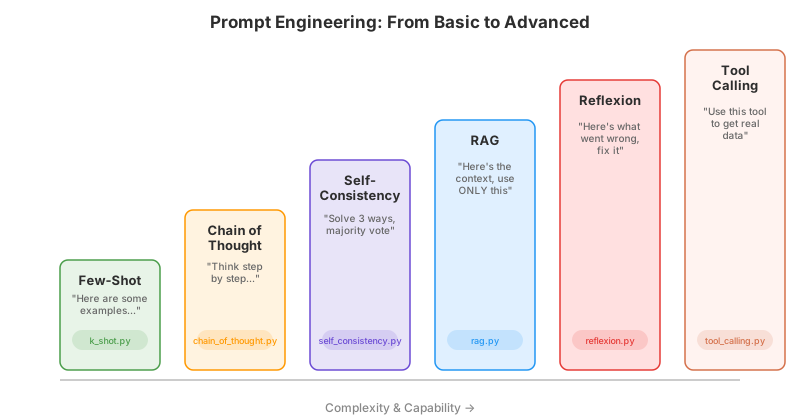
1. Few-Shot Prompting: “Learn by Example”
The idea: Instead of explaining the rules, show the model examples of correct input-output pairs and let it figure out the pattern.
In my assignment, I needed Llama to reverse the word “httpstatus.” Instead of explaining reversal, I gave it examples:
system_prompt = """You reverse the letters of a word.
Output ONLY the reversed word.

Word: httpstatus
Reversed: sutatsptth

Word: hello
Reversed: olleh

Word: httpstatus
Reversed: sutatsptth"""
Why it works: LLMs are pattern-completion machines. When they see a consistent pattern of input → output, they extrapolate. Few-shot prompting exploits this by giving the model a “template” to follow.
Watch out for:
- Example quality matters more than quantity. One wrong example can derail the model. Three clean, diverse examples usually beat ten repetitive ones.
- Order affects results. Put simpler examples first, harder ones last. The model pays more attention to recent context.
- It doesn’t teach understanding. The model mimics the pattern without truly “getting” it — which is why it still fails on edge cases like unusual tokenization (see my first blog post).
2. Chain-of-Thought: “Think Step by Step”
The idea: Ask the model to show its reasoning process before giving the final answer.
I used this to solve 3^{12345} mod 100:
system_prompt = """You solve user's problem. Think step by step.
Output the reasoning trace and the final answer."""
Why it works: When you force the model to generate intermediate steps, those steps become additional context that guides the final answer. It’s like giving the model a “scratch pad” — the act of writing out the reasoning helps it stay on track.
Watch out for:
- The reasoning might be fake. As I discovered (and wrote about), the model can generate plausible-looking steps that don’t actually support the conclusion. It may know the answer and build the reasoning backwards.
- Longer outputs cost more. CoT increases token usage significantly. For simple tasks, it’s overkill.
- Garbage in, garbage out. If the first step goes wrong, every subsequent step compounds the error.
3. Self-Consistency: “Ask Three Times, Trust the Majority”
The idea: Have the model solve the same problem multiple times using different approaches, then pick the most common answer.
My implementation was the most elaborate prompt of the set:
system_prompt = """You will solve every problem multiple times
using different reasoning approaches.

1. Reasoning 1: Solve step by step, directly.
   Answer: <number>

2. Reasoning 2: Solve again from scratch,
   using a different framing (e.g. work backwards).
   Answer: <number>

3. Reasoning 3: Solve by checking concrete
   positions or values.
   Answer: <number>

4. Compare the three answers. Pick the majority vote.
   Answer: <number>"""
The code then ran this 5 times and took the majority answer across all runs.
Why it works: Different reasoning paths hit different failure modes. If two out of three approaches agree, the shared answer is more likely to be correct. It’s the same logic behind “ask three doctors”: one might be wrong, but if two agree, trust them.
Watch out for:
- Cost multiplies. You’re using 3x the tokens per call, and running multiple calls. Budget accordingly.
- Diversity matters. If all three “different” approaches are secretly the same method rephrased, you get no benefit. Be specific about how each approach should differ.
- Not all tasks benefit. For creative writing or subjective tasks, there’s no “correct” answer to vote on.
4. RAG: “Here’s What You Need to Know”
The idea: Give the model external documents as context so it doesn’t have to rely on (potentially outdated or incorrect) training data.
My assignment required writing a function that calls a documented API. The key was feeding the API docs directly into the prompt:
user_prompt = f"""Context (use ONLY this information):
{api_docs}

Task: Write a Python function fetch_user_name(user_id, api_key)
that calls the documented API.

Requirements:
- Use the documented Base URL and endpoint.
- Send the documented authentication header.
- Return only the user's name string."""
Why it works: LLMs hallucinate when they don’t have information. RAG solves this by providing the exact information the model needs, right in the prompt. No guessing, no hallucinating endpoints or parameters.
Watch out for:
- Context window limits. You can’t dump an entire codebase into a prompt. Choose the most relevant documents carefully.
- “Use ONLY this information” is important. Without it, the model might mix context with training data and invent fields that don’t exist.
- Retrieval quality is everything. RAG is only as good as the documents you feed it. Bad retrieval → bad answers, no matter how good the model is.
5. Reflexion: “Learn From Your Mistakes”
The idea: Let the model generate an answer, test it, show it what went wrong, and ask it to fix the code.
My assignment implemented a two-pass loop: generate → test → show failures → regenerate. A key detail: the two passes use different system prompts. The first pass gets a simple generation prompt; the reflexion pass gets a specialized correction prompt with the failure context.
Pass 1 — Initial generation (simple, no feedback):
system_prompt = """You are a coding assistant. Output ONLY a single
fenced Python code block that defines the function
is_valid_password(password: str) -> bool. No prose or comments."""
Pass 2 — Reflexion (given the previous code + what went wrong):
reflexion_prompt = """You are a coding assistant performing
self-correction (reflexion).

You will be given:
1. A previous implementation that failed some test cases.
2. A list of failing test cases with expected vs. actual results
   and specific validation rules that failed.

Your job:
- Read the failure report carefully.
- Identify exactly which checks were wrong, missed, or inverted.
- Produce a corrected implementation."""
The reflexion prompt receives the actual failing output as context — for example: "Input: Password1 → expected True, got False. Failing checks: missing special". The first pass often missed edge cases. But after seeing exactly which tests failed and why, the second pass nailed it.
Why it works: Reflexion mimics how humans debug: write code → run tests → read errors → fix. The model doesn’t need to get it right the first time; it just needs to get it right eventually, guided by concrete feedback.
Watch out for:
- Feedback quality is critical. “It’s wrong, try again” is useless. “Input ‘Password1’ returned True but should return False because it’s missing a special character” — that’s actionable.
- One iteration might not be enough. Complex bugs may need multiple rounds of reflexion. But too many rounds risk the model going in circles.
- The model can over-correct. It might fix the failing case but break a previously passing one. Always re-run all tests, not just the failing ones.
6. Tool Calling: “Use Real Tools, Don’t Pretend”
The idea: Instead of asking the model to compute or guess, let it call external tools (APIs, code interpreters, databases) and work with real results.
My assignment required the model to call a Python function that parses source files:
system_prompt = """You are a tool-calling assistant.
Respond with ONLY a JSON object:
{"tool": "<tool_name>", "args": {<arguments>}}

Available tools:
[
  {
    "name": "output_every_func_return_type",
    "description": "Parse a Python file and return
    function_name: return_type for each function.",
    "parameters": {
      "file_path": { "type": "string" }
    }
  }
]"""
The model outputs a structured tool call; the code actually executes the tool and returns real results.
Why it works: This is the solution to the “fake code execution” problem from my second blog post. Instead of the model pretending to run code, it actually runs code. Instead of guessing what an API returns, it calls the API. Real data, real results, no hallucination.
Watch out for:
- Prompt format must be strict. The model needs to output valid JSON that your code can parse. One extra word outside the JSON and parsing fails. Be very explicit about the output format.
- Security matters. If the model can call arbitrary tools, it can do damage. Always validate and sandbox tool calls.
- Not every model supports it natively. Smaller models may struggle with structured JSON output. Larger models (GPT-4, Claude) have built-in tool-calling support.
Why Do These Techniques Exist?
All six techniques address the same root problem: LLMs are text predictors, not reasoners. They predict the most likely next token given the context. Every prompting technique is essentially a way to engineer the context so that the most likely next token is also the correct one.
| Technique | Core Strategy |
|---|---|
| Few-Shot | Set up a pattern the model can continue |
| Chain-of-Thought | Create intermediate context that guides the answer |
| Self-Consistency | Reduce variance by aggregating multiple attempts |
| RAG | Replace guessing with grounding in real data |
| Reflexion | Use feedback to iteratively narrow down the correct answer |
| Tool Calling | Bypass generation entirely for tasks that need computation |
The progression tells a story: we started by hoping the model would “just get it,” and gradually moved toward giving it more structure, more data, and more tools — because hoping isn’t a strategy.
Try It Yourself
Want to practice prompt engineering? Here are two excellent resources:
Prompting Guide — A comprehensive, open-source reference covering every technique from zero-shot to advanced agent patterns. Great as a lookup reference.
Learn Prompting — An interactive course with hands-on exercises. Free and well-structured for beginners to advanced users.
Anthropic’s Interactive Tutorial — Jupyter notebook-based course with a built-in playground at the bottom of each lesson for live experimentation.
Key Takeaways
- The prompt is the program. How you ask is often more important than which model you use.
- Start simple, escalate as needed. Few-shot handles most tasks; reach for CoT, RAG, or tools only when simple prompts fail.
- Every technique has a cost. More tokens, more API calls, more complexity. Match the technique to the stakes.
- Always verify outputs. No technique eliminates hallucinations entirely — they just reduce the probability.
- Combine techniques. The real power comes from mixing: RAG + CoT + Tool Calling is how production AI systems work.
Every prompting trick is just a communication skill we forgot we already had.
Useful Resources
- Prompt Engineering Guide
- Learn Prompting — Free Interactive Course
- Anthropic Interactive Prompt Engineering Tutorial (GitHub)
- OpenAI Prompt Engineering Best Practices
- Self-Consistency Improves Chain of Thought Reasoning (arXiv)
- Reflexion: Language Agents with Verbal Reinforcement Learning (arXiv)
- Chain-of-Thought Prompting Elicits Reasoning in LLMs (arXiv)
- Retrieval-Augmented Generation for Knowledge-Intensive NLP Tasks (arXiv)
Comments