Have you ever asked ChatGPT to reverse a word and gotten a wrong answer? I did — and it led me down a fascinating rabbit hole about how AI actually “reads” text.
The Story: A Homework Assignment Gone Wrong
I was working on an assignment for my CS146S course (The Modern Software Developer) where the task was straightforward: get an LLM to reverse the letters of a word. Sounds simple, right?
Here’s the code I wrote, using k-shot prompting with Llama 3.1:
from ollama import chat

YOUR_SYSTEM_PROMPT = """You reverse the letters of a word.
Output ONLY the reversed word, with no explanation, no punctuation,
and no other text.

Word: httpstatus
Reversed: sutatsptth

Word: hello
Reversed: olleh

Word: httpstatus
Reversed: sutatsptth"""

USER_PROMPT = """
Reverse the order of letters in the following word.
Only output the reversed word, no other text:

httpstatus
"""

EXPECTED_OUTPUT = "sutatsptth"

response = chat(
    model="llama3.1:8b",
    messages=[
        {"role": "system", "content": YOUR_SYSTEM_PROMPT},
        {"role": "user", "content": USER_PROMPT},
    ],
    options={"temperature": 0.5},
)
print(response.message.content.strip())
Even with 5 examples showing the correct reversal, the model kept getting it wrong! It would output things like “sutattsptth” or “statustpth” — close, but not right.
This isn’t just a Llama problem. Try asking GPT-4 or Claude to reverse “httpstatus” — they’ll often struggle too. But why?
The Answer: LLMs Don’t See Letters
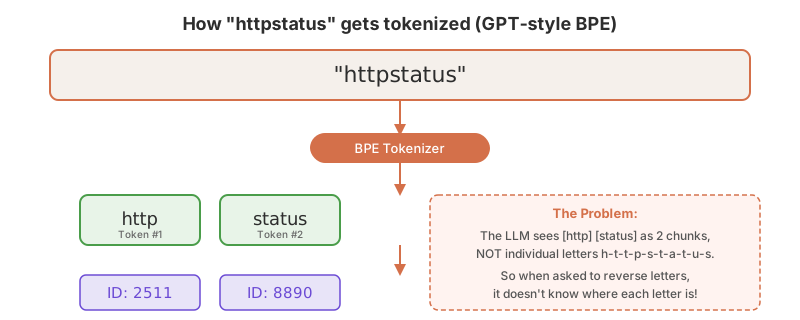
Here’s the key insight: LLMs don’t read text letter by letter like humans do. They read in chunks called tokens.
When you type “httpstatus”, the AI doesn’t see:
h - t - t - p - s - t - a - t - u - s
Instead, it sees something like:
[http] [status]
That’s it. Two chunks. The individual letters are invisible to the model.
What Are Tokens?
A token is the basic unit of text that an LLM processes. Think of it as the “atom” of language for AI. Tokens can be:
- A whole word:
hello→ 1 token - Part of a word:
running→run+ning(2 tokens) - A single character: rare characters might be individual tokens
- Punctuation:
.!?are usually their own tokens - Even spaces: in some tokenizers, spaces are part of the token
For example, the sentence “I love AI” might become 3 tokens: [I] [love] [AI]. But “tokenization” might become [token] [ization] — two tokens.
Why not just use individual letters? Because that would be incredibly expensive. The sentence “Hello, how are you?” has 20 characters but only about 6 tokens. Fewer tokens = less computation = faster and cheaper responses.
Why Do LLMs Need Tokenizers?
Neural networks only understand numbers, not text. So before any text reaches the AI’s “brain,” it must be converted to numbers. The process works like this:
- Text → split into tokens (by the tokenizer)
- Tokens → mapped to numeric IDs (from a vocabulary)
- Numeric IDs → processed by the neural network
- Output IDs → converted back to tokens → text
The tokenizer is essentially the AI’s “eyes” — it determines what the model can and cannot see. And just like human eyes have blind spots, tokenizers have blind spots too. Letter-level operations fall right into that blind spot.
How Does Tokenization Work? The BPE Algorithm
The most popular tokenization method is called Byte Pair Encoding (BPE). It’s surprisingly elegant:
- Start with all individual characters as your vocabulary
- Count which pair of adjacent characters appears most frequently in your training data
- Merge that pair into a new token
- Repeat steps 2-3 until you reach your desired vocabulary size
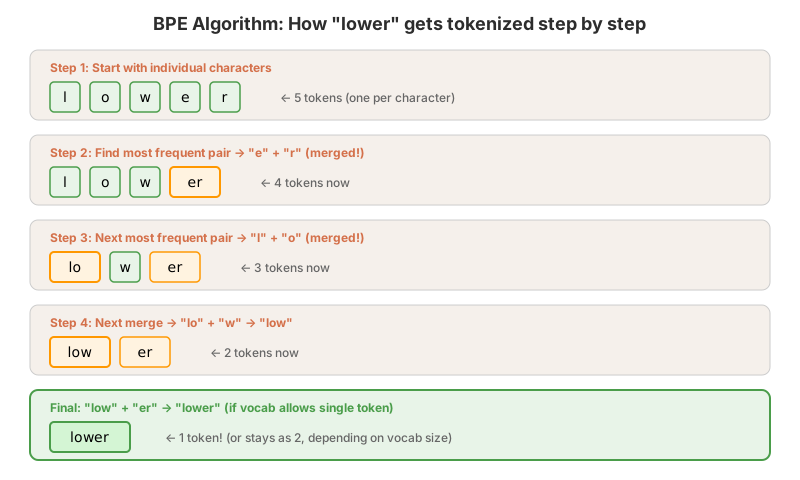
For example, if your training data has lots of English text, “th” appears very frequently, so it gets merged early. Then “the” becomes common, so that gets merged too. Eventually, common words like “the”, “and”, “is” become single tokens, while rare words get split into pieces.
A Concrete Example
Let’s say we’re building a tiny BPE vocabulary from the text “low lower lowest”:
| Step | Action | Vocabulary Change |
|---|---|---|
| 0 | Start with characters | l, o, w, e, r, s, t |
| 1 | Most frequent pair: l + o → merge |
Add lo |
| 2 | Most frequent pair: lo + w → merge |
Add low |
| 3 | Most frequent pair: e + r → merge |
Add er |
| 4 | Most frequent pair: e + s → merge |
Add es |
After training, “lower” tokenizes as [low][er] instead of 5 separate characters. Efficient!
Different Tokenizers for Different Models
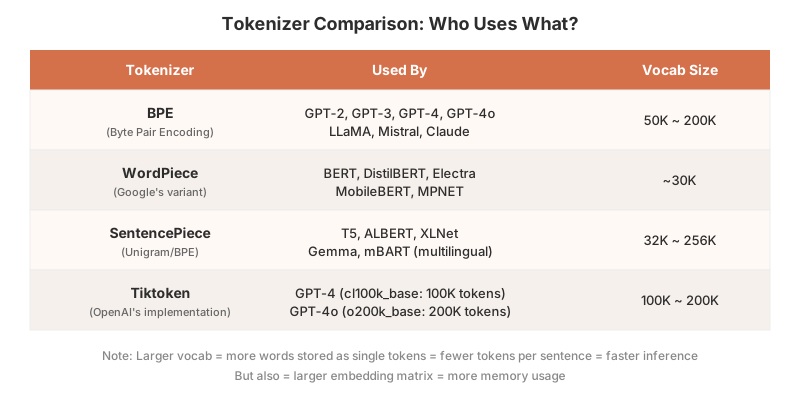
Not all LLMs use the same tokenizer. Here’s a quick overview:
BPE (Byte Pair Encoding)
- Used by: GPT-2, GPT-3, GPT-4, LLaMA, Mistral, Claude
- How it works: Merges frequent character pairs iteratively
- Variant: Byte-level BPE starts with 256 byte values instead of characters, handling any language/encoding
WordPiece
- Used by: BERT, DistilBERT, Electra
- How it works: Similar to BPE, but selects merges based on likelihood (which merge increases the training data probability most)
- Key difference: Uses
##prefix for sub-word continuations (e.g., “playing” →play+##ing)
SentencePiece (Unigram)
- Used by: T5, ALBERT, XLNet, Gemma
- How it works: Starts with a large vocabulary and removes tokens that least affect the overall likelihood
- Key difference: Treats text as a raw stream (no pre-tokenization by spaces), making it great for multilingual models
Tiktoken (OpenAI’s Implementation)
- GPT-4: Uses
cl100k_basewith ~100K tokens - GPT-4o: Uses
o200k_basewith ~200K tokens (double the vocabulary!) - Larger vocabulary = more words as single tokens = faster inference
What About Chinese? Tokenization Across Languages
English has spaces between words. Chinese, Japanese, and Thai don’t. So where do you split “我喜欢人工智能” (I love AI)?
- Character-level:
[我][喜][欢][人][工][智][能]— 7 tokens. Safe but wasteful. - Word-level:
[我][喜欢][人工智能]— 3 tokens. Efficient but needs a word segmentation tool first. - Subword (BPE): A middle ground — common words like
人工智能become single tokens, rare ones get split.
The key breakthrough was SentencePiece, which treats input as a raw byte stream instead of assuming spaces between words. This makes it work naturally for any language. That’s why it’s the go-to for multilingual models like T5 and Gemma.
Vocabulary size matters here too. GPT-4o’s tokenizer (o200k_base, 200K tokens) is twice the size of GPT-4’s (cl100k_base, 100K tokens), and a big chunk of those extra tokens went to non-English languages. Try pasting Chinese text into Tiktokenizer — GPT-4o consistently produces fewer tokens for the same input.
Try It Yourself!
Want to see how different models tokenize text? Check out this awesome online tool:
Tiktokenizer — paste any text and see exactly how GPT-4, GPT-3.5, and other models break it into tokens.
Try typing “httpstatus” and see how it splits! Then try “h t t p s t a t u s” (with spaces) and notice the difference.
So How DO We Get LLMs to Reverse Letters?
Now that we understand the problem, here are effective solutions:
Method 1: Separate the Characters First
The simplest fix — give the model characters it can actually “see”:
# Instead of: "Reverse: httpstatus"
# Do this:
prompt = """The letters are: h, t, t, p, s, t, a, t, u, s
Now write them in reverse order, separated by commas:"""
# Output: s, u, t, a, t, s, p, t, t, h
# Then join: "sutatsptth" ✓
Method 2: Chain-of-Thought (Step by Step)
Ask the model to first list the letters, then reverse:
prompt = """Reverse the letters in "httpstatus".

Step 1: List each letter with its position:
Position 1: h
Position 2: t
Position 3: t
Position 4: p
Position 5: s
Position 6: t
Position 7: a
Position 8: t
Position 9: u
Position 10: s

Step 2: Now list them from last position to first:"""
Method 3: Use Code Execution
The most reliable approach — let the model write and run code:
prompt = """Write Python code to reverse the string "httpstatus"
and output only the result."""

# Model outputs: print("httpstatus"[::-1])
# Result: sutatsptth ✓
Method 4: Fine-tuning with Character-Level Tasks
For production systems, models can be fine-tuned with Token Internal Position Awareness (TIPA) — training them on tasks that require knowing character positions within tokens. This is an active research area.
Key Takeaways
- LLMs don’t see individual letters — they see tokens (chunks of text)
- Tokenization is a trade-off: efficiency vs. character-level awareness
- “Simple” text tasks can be hard for AI when they require letter-level manipulation
- Workarounds exist: character separation, chain-of-thought, and code execution all help
- The tokenizer is the AI’s “eyes” — its capabilities and limitations shape what the model can do
AI doesn't misunderstand language — it never saw it the way we do.
Useful Resources
- Tiktokenizer — Online Tokenizer Visualization Tool
- Let’s Build the GPT Tokenizer — Andrej Karpathy (YouTube)
- Hugging Face — Tokenization Algorithms Summary
- Hugging Face — BPE Tokenization Explained
- OpenAI Tiktoken Library (GitHub)
- How Tokenizers Work in AI Models (Nebius)
- Sebastian Raschka — Implementing BPE from Scratch
- Why LLMs Struggle to Count Letters (arXiv)
Comments