
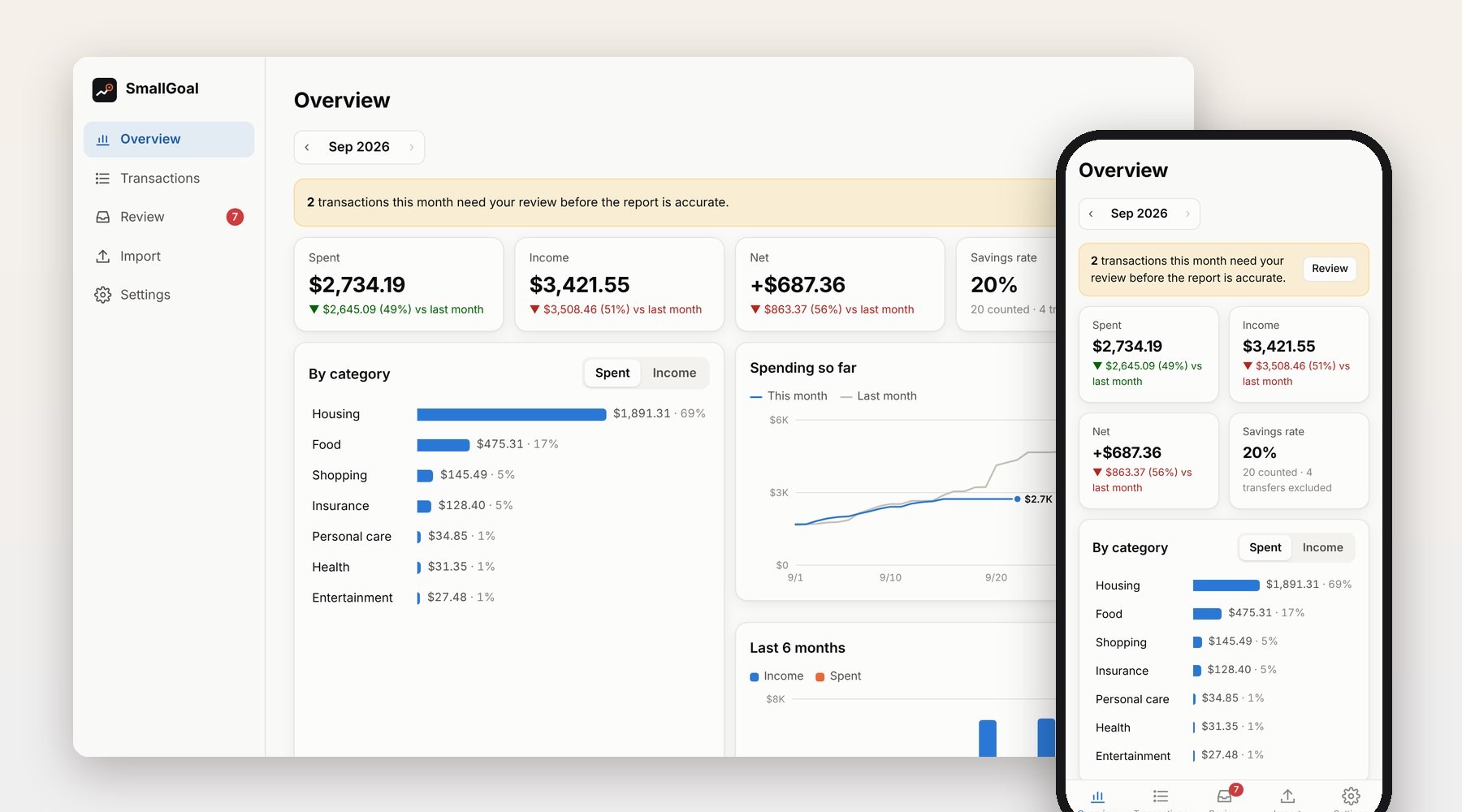
I wanted to see where my money goes each month without handing my bank data to yet another app. SmallGoal is what I built for that, starting about a month ago. It runs on my own laptop. Transactions from my cards and bank accounts come in, get cleaned up and sorted, and turn into a monthly report I can read on the computer or on my phone.
What it does
Transactions come in two ways. I can upload the CSV a bank lets you download; Chase, Amex, Discover, Capital One, Citi, Bank of America and Wells Fargo are recognized, and other banks are matched by their column headers. Or I connect an account once through Plaid and it syncs by itself, catching up on whatever happened while the laptop was off and then checking every three hours.
Each transaction is sorted into a two-level category, by rules first and the bank’s own category as a fallback.
It watches for the things that make a home-made budget quietly wrong. Paying off a credit card from checking shows up twice, once on each account; SmallGoal pairs the two and leaves both out of spending. Importing the same file twice doesn’t create duplicates, and two coffees at the same price on the same day still count as two.
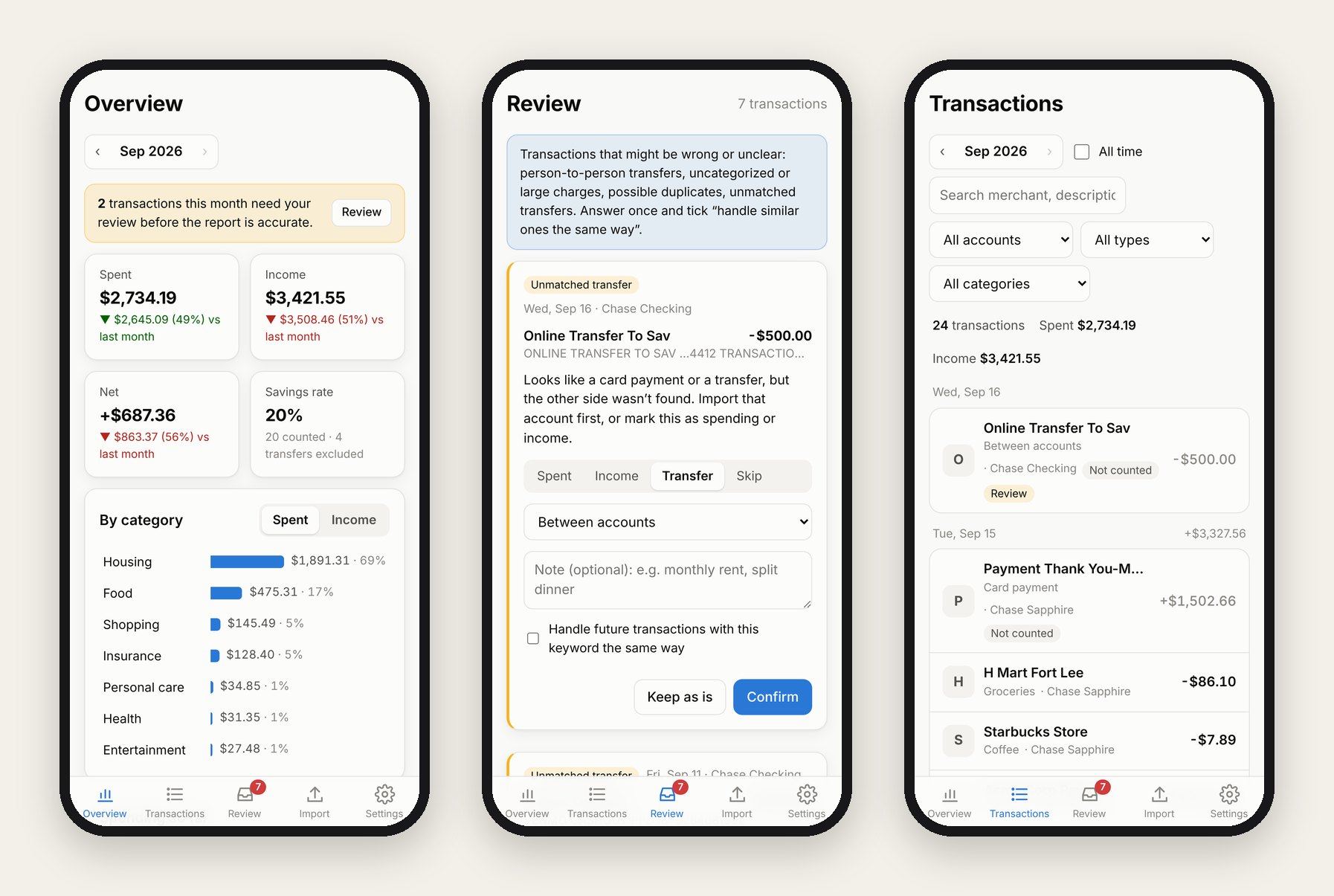
When it isn’t sure, it asks. Zelle and Venmo transfers, charges it can’t categorize, large purchases, possible duplicates and transfers with no matching side all go to a review queue. I answer once, tick “handle similar ones the same way”, and that answer becomes a rule.
The monthly overview shows spending, income, net and savings rate against last month, spending by category, a running total against the same point last month, the last six months, top merchants and a per-account breakdown. On the phone it’s an installable web app, reachable over home Wi-Fi with an access token or from anywhere through Tailscale.
The screenshots use the app’s built-in demo data, not my accounts. The app itself is in Chinese; the interface text in these screenshots has been translated for this page.
How it’s built
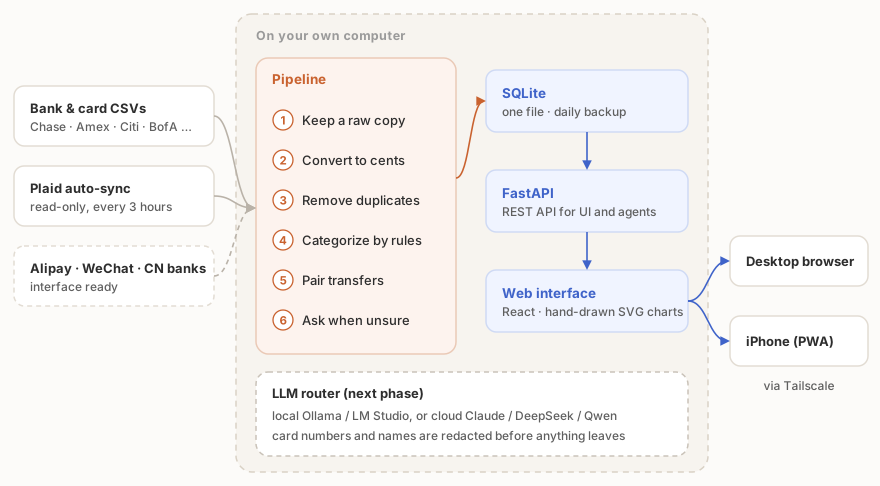
Everything runs on one Windows laptop. A FastAPI server provides the REST API and also serves the web interface. The data is a single SQLite file, backed up every day, and schema changes go through Alembic migrations so an upgrade never loses anything.
Every new transaction, wherever it came from, goes through the same six steps. The original row is stored untouched first, so anything can be reprocessed later. Amounts are kept as whole cents to avoid rounding errors. Duplicates are caught by the bank’s transaction ID when there is one, and otherwise by account, date, amount and description. Then rules assign a category, transfers are paired across accounts, and anything doubtful goes to review.
Data sources are plugins. Adding a bank means writing one class that says how to recognize its file and how to read it; de-duplication, categories, transfer pairing and reports all come with it. The plugins for Alipay, WeChat Pay and Chinese bank statements are already stubbed out for when I move back.
A few rules the code sticks to. If I’ve changed a transaction by hand, no automatic step will overwrite it. Bank passwords never pass through the app: Plaid’s hosted page handles the login, and the app only receives a read-only token, which is stored outside the database. The backend has six runtime dependencies and the frontend two, React and React DOM; the charts are drawn by hand in SVG. The test suite includes a fake Plaid server, so syncing can be tested without a bank.
What comes next
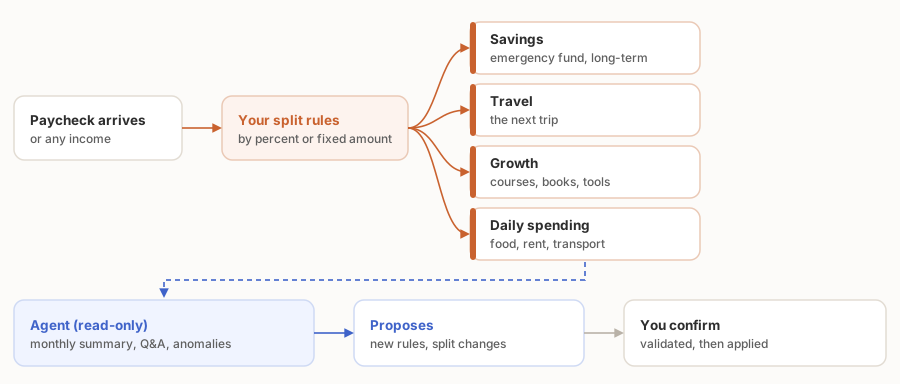
Virtual accounts. Right now SmallGoal tells me where money went. The next step is deciding where it should go before it’s spent. When income arrives, it gets split by rules I set, by percentage or by a fixed amount, into virtual accounts for different purposes: savings, travel, growth and daily spending. Each one has its own balance. No money moves between real bank accounts; it’s a layer of bookkeeping on top of them.
An agent for financial analysis. The model layer is already in the code. It talks to local models (Ollama, LM Studio) and cloud APIs (Claude, DeepSeek, Qwen) through one interface, falls back to the next one when a model fails, can be set to local-only, and strips card numbers, account numbers and names before anything goes to the cloud. On top of it, an agent will write a monthly summary, answer questions about my own spending, point out unusual charges and suggest rules. It reads but doesn’t write. Anything it proposes goes through the same checks as a manual edit, and only after I confirm.
Further out: reading bank alert emails for near-real-time updates, push notifications, packaging the phone version as an iPhone app, and Chinese payment sources.
Personal project. The code is private.